

Services For SureCart
Sell services and custom deliverables with SureCart!
New Features
New Shortcode To Display The Product’s Submitted Requirements In The Checkout
In version 1.4, we introduced the ability to place input fields directly on the product page, making it easier to collect important details from your customers upfront. Now, in version 1.5, we’re taking it a step further! You can display those submitted product requirements directly on the checkout page.
This means both you and your customers can quickly review key details—like design preferences, appointment times, or any special requests—before finalizing the purchase. It’s a simple addition that helps avoid confusion and keeps everything clear right up to checkout.


New Number Of Services Allowed Per Order Setting
For one-time purchases and installment plans, you can now define the maximum number of services a customer can create from a single order. This is ideal for businesses offering bundled services like coaching calls or design requests. Customers can easily create and manage their allocated services through a convenient button in their dashboard.

New Subscription Services Feature
This powerful addition helps you manage recurring services tied directly to your customers’ subscription billing cycles.
Imagine running a graphic design business where customers can request up to five new designs each month, or offering a social media management subscription where clients can schedule weekly content reviews. A photography studio might let subscribers book quarterly photo shoots, while a consulting service could allow a set number of strategy sessions each year. The possibilities are endless, making this feature adaptable to nearly any service-based business.
This update offers powerful control over how services are created and managed within subscriptions:
- Service Limits: Set a limit on the number of services a customer can create per billing cycle or per a custom frequency (daily, weekly, monthly, etc.). The custom frequency must be shorter than or equal to the billing cycle.
- Automatic Service Creation: Automatically create a new service for each billing cycle (or custom frequency).
- Rollover: Choose whether unused service allocations should roll over to the next billing cycle or expire.
Subscription Services is designed to streamline recurring offerings and help you deliver consistent value to your customers.

New Number Of Available Services Remaining In Main Services List
Since we now offer multiple services per order, both for single orders and subscriptions, we thought it would be beneficial to display the total number of remaining services in the main services list. This way, when a customer views the list and clicks the button to create a new service, they can easily see how many services they have left.

New Plan Details Section Individual Service Details For Number Of Remaining Services
Now that we have the subscription services feature, we wanted to make sure you could see details related to the subscription within the service view. We added a new “Plan Details” section, which shows the remaining services and next renewal date.

New Customization Options: Rename “Service” and “Services” + Customize Customer Dashboard Labels
We’re excited to introduce powerful new customization options that let you tailor the wording of “Service” and “Services” throughout your interface—both for customers and admins. This update makes it easier to align terminology with your unique business model and improve clarity for your users.
Rename “Service” and “Services” Across Your Site
Now, you can replace the singular word “Service” and the plural word “Services” with terms that better fit your use case. Whether you offer Design Requests, Coaching Sessions, Appointments, Custom Orders, or something else entirely, this new setting ensures that your customers and team see the most relevant terminology across the entire interface.
Customize the Services Tab in the Customer Dashboard
We’ve added a new setting that lets you customize the text of the Services tab in the customer dashboard. This means you can adjust the wording to match what you offer. For example:
✅ If you sell personalized items, you could rename it to Custom Orders.
✅ If you run a coaching business, you might call it Coaching Sessions.
✅ If you offer consultations, you can change it to Consultations.
This small but impactful update makes your dashboard more intuitive and user-friendly for customers.
Change the Customer Dashboard Tab Icon
In addition to renaming the tab, you can now customize the icon used in the customer dashboard navigation. Choose an icon that visually represents your services, making the dashboard even more personalized and branded to your business.
These new customization options give you more control over your platform’s appearance and language, ensuring a seamless experience for both customers and administrators. Let us know how you’re using this feature in your business!


New Customer Name Added To Order Details Section In Individual Services Admin View
A customer pointed out to us that the customer’s name was not visible within an individual service. We quickly added this in the Order Details section, so this is a nice little improvement!

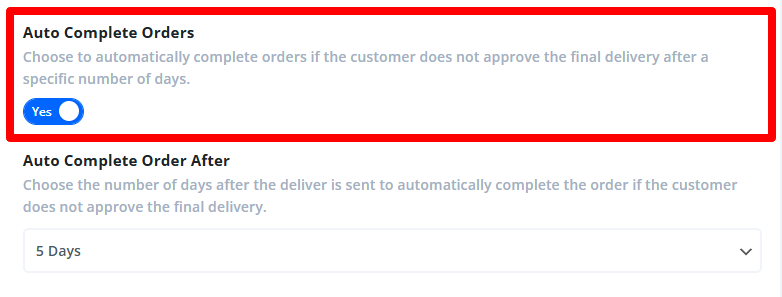
New Setting To Optionally Enable Or Disable The Auto Complete Order Feature
In this update, we give you more control over the existing auto-complete service feature. Previously, you could set the number of days after a final delivery for a service to be automatically marked as complete. Now, you have the option to completely enable or disable this auto-complete functionality. This gives you full control over whether services should finalize automatically or remain open until manually completed.
Updated Requirements Fields Settings UI
We’ve refined the Requirements Fields settings user interface to make it more intuitive and user-friendly. The new layout simplifies the process of moving and rearranging form fields, and with the toggle-style interface, you can now focus on editing each field one at a time without distractions. This improvement is part of our ongoing effort to make our addons easier to use and more efficient for you. What’s more, we’ll be incorporating this same layout style across our other addons, including an exciting new feature coming soon in our Toolkit for SureCart addon.

Added Services Column To The Main SureCart Orders Page
We are excited to finally be able to add a new Services column in the SureCart orders screen. Now you can easily access the service from the orders, just like you can access the orders from the services. It’s a minor improvement but a big convenience.

Even More Features Coming Soon
I hope you enjoy this huge update! was a big one that took a long time to complete, and we are excited to look ahead now to some other big features like milestones and resource library.
Thank you for your continued support and enthusiasm for Services for SureCart!

Purchase Services For SureCart!
Visit the product page to learn more!


0 Comments